Restaurant & Café Website Design
A menu people can actually read on their phone, table booking in three taps, and orders straight to your WhatsApp.
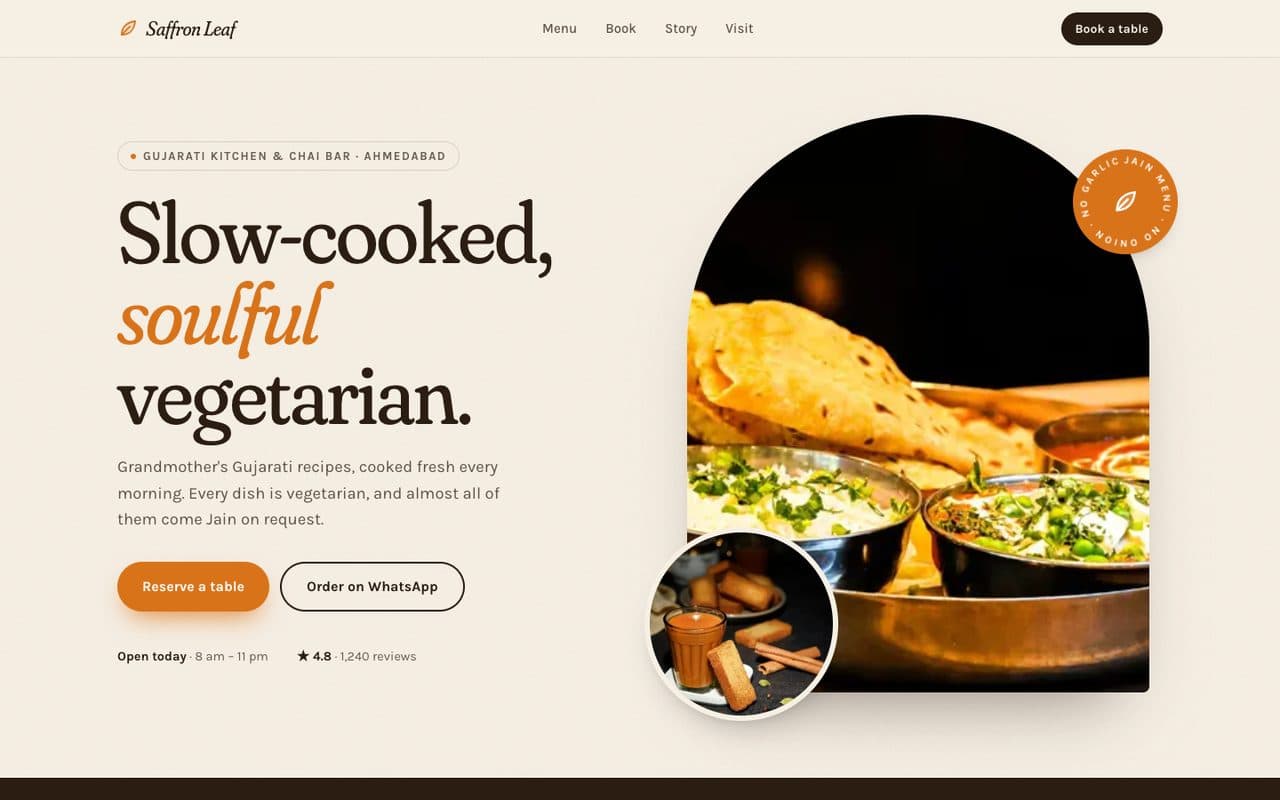
Saffron Leaf is a fictional business. We adapt the language, payments and details to wherever you work.
Most people decide where to eat on their phone, in under a minute, standing somewhere else. They want three things: what's on the menu, whether you're open, and a way to book or order without calling. This template does all three beautifully. The menu is real text (so Google can read it), dishes carry clear veg and Jain markers, booking is a few taps, and orders arrive as a ready-to-confirm WhatsApp message - no aggregator commission.
Try each of these in the demo.
A menu that sells
Category tabs, dish photos, prices and dietary markers - searchable text, not a blurry PDF.
Table booking in three taps
Party size, day and time slot. Requests land in your inbox or WhatsApp to confirm.
Order on WhatsApp
Guests build an order on the site; it opens WhatsApp with the whole order typed out. No commission.
Found on Google
Restaurant schema, opening hours and menu markup so you show up for “cafe near me”.
A complete site, built for you.
Designed around your brand and photos, written with you, fast on any phone, and yours to own.
- ✓Home
- ✓Menu
- ✓Book a table
- ✓Order online
- ✓Our story
- ✓Events & catering
- ✓Contact & map
- ✓WhatsApp ordering
- ✓Google Maps & reviews
- ✓Online payments
- ✓Instagram feed
- ✓Search-ready structure & schema
- ✓Analytics from day one
What every restaurant website needs
A restaurant website has one job: turn a hungry person scrolling on their phone into a booking, an order or a walk-in. Everything below exists because it removes a reason to give up and pick somewhere else.
- 01
A menu written in real text
Guests check the menu before anything else, usually on mobile data. A PDF or a photo of a printed menu is slow to open, impossible to zoom comfortably and invisible to Google. A text menu with categories, prices and short descriptions loads instantly and lets you rank for the dishes you're known for.
- 02
Opening hours that are always right
Wrong hours cost more trust than any bad review. Hours belong in the header and footer, with special hours for holidays, and in structured data so Google shows the same times in search and Maps.
- 03
Booking without a phone call
Many guests would rather not call, especially to book for later. A short form - party size, day, time - captures the booking when the idea strikes, even while you're closed. Requests go to your inbox or messaging app for a quick confirm.
- 04
Ordering that keeps the margin with you
If you take takeaway or delivery orders, a direct ordering path means you keep the full bill. Guests build the order on your site and it arrives already typed out, ready to accept, with nothing for you to retype.
- 05
Dietary markers people can trust
Vegetarian, vegan, gluten-free, nut-free and other markers next to each dish answer the most common questions before anyone has to ask. Clear labelling builds loyalty with guests who have to be careful about what they eat.
- 06
Local search basics done properly
Restaurant schema, a consistent name, address and phone number, an embedded map, and links to your reviews help you appear for 'near me' searches. These are invisible details that decide whether you show up at all.
Mistakes we design out.
Autoplay video heroes
They look impressive on office Wi-Fi and stall on a phone with two bars of signal. We use fast, sharp photography and keep video optional.
Menus that live only on social media
Posts get buried within days and aren't searchable. Your menu lives on your site and can be shared from there.
A contact page with only a form
Hungry people want a number to tap and directions to follow. Both sit one tap away on every page.
What you'll need to send us.
Nothing needs to be perfect. Send what you have and we'll help shape the rest.
- ✓Your menu with prices and dietary information
- ✓Opening hours, including holiday hours
- ✓A few good photos of food and the space (or we arrange a shoot)
- ✓Your logo and any brand colours
- ✓Where bookings and orders should arrive
- ✓Links to your reviews and social pages
Pair it with Plated, our iPhone app for this industry.
Know the true cost of every dish on your menu.
Questions, answered.
Can I update the menu myself?
Yes. Dishes, prices, photos and availability are edited from a simple dashboard - no developer needed for day-to-day changes.
Do online orders go through an aggregator?
No. Orders go to your own WhatsApp or inbox, and payments (if you take them online) go straight to your account. You keep the full bill.
Can it work in more than one language?
Yes. We can add a language switch so the menu and booking work in the languages your guests read.
Will the website help us show up in 'near me' searches?
It gives you the foundations Google looks for: restaurant structured data, consistent contact details, fast mobile pages and a menu in real text. Paired with an up-to-date business profile and steady reviews, that's what moves local rankings.
Can we show different menus for lunch, dinner and events?
Yes. Menus can be split by time of day or occasion, and items can be marked sold out or seasonal without touching the rest of the site.
How long does it take?
A site like this demo usually goes live in two to four weeks, depending on the number of pages and integrations.
Further reading: what a small business website needs, by industry →